Claude Code usage limits: 5-hour and weekly resets
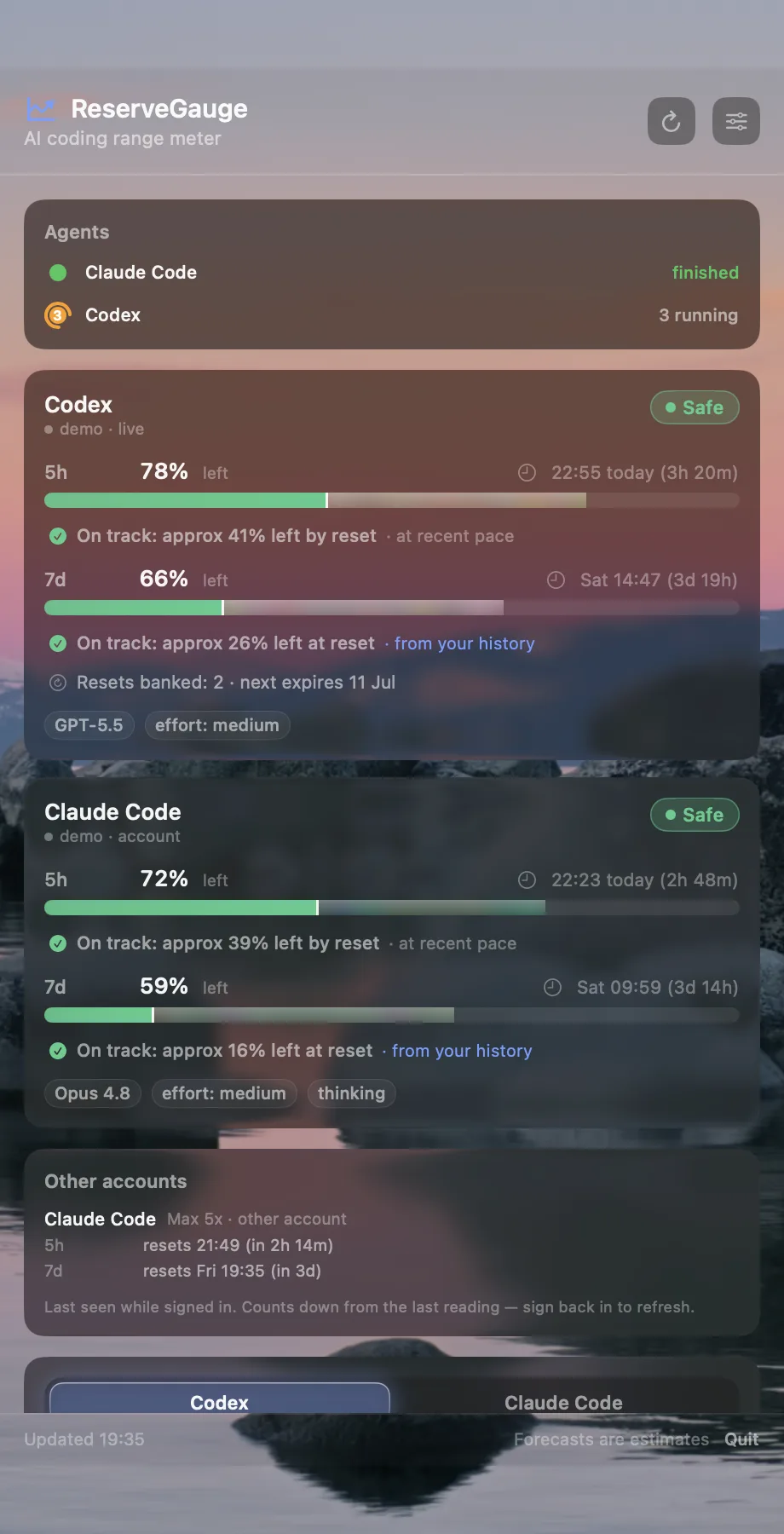
Claude Code usage is governed by the allowance attached to your Claude plan. Paid plans have a five-hour session limit and a separate weekly limit; Max plans also have a separate weekly limit for Fable. The amount a task consumes depends on conversation length, model, effort level and how much context it needs. Your Claude Usage settings show the remaining allowance and expected reset time. ReserveGauge reads the available account information locally, keeps a usage history on your Mac and forecasts whether your current pace is likely to reach the next reset.
How Claude Code usage limits work
Subscription usage is shared across Claude, Claude Code and Claude Desktop. A long conversation, a higher-effort setting or a more complex coding task can consume more allowance than a short request. API-key sessions are different: they are billed by usage instead of drawing from a subscription cap.
How five-hour and weekly resets differ
Paid Claude plans have a five-hour session limit and a separate weekly usage limit. The weekly reset is scheduled for a fixed day and time on your account. Max plans also have a separate weekly limit for Fable. Check Settings → Usage for the limits and reset times Anthropic reports for your plan. See Anthropic's usage-limit guidance and its paid-plan reset details.
Hypothetical: Suppose your all-model weekly limit is exhausted when the five-hour session resets. The session allowance refills, but the weekly limit remains exhausted until its own reset, so included subscription use can still be blocked. If usage credits are enabled on an eligible paid plan, Claude can continue on those credits at standard API rates. This is separate from an API-key session, which is billed per token to its configured Console or cloud account; see Anthropic's Claude Code billing guidance.
Those are provider-reported reset times. ReserveGauge's local forecast estimates whether your current pace will use the remaining allowance before reset; it does not determine when Anthropic restores it.
How to check Claude Code usage
Open Settings → Usage in Claude or run /usage in Claude Code to see the provider's current usage details. Anthropic's Claude Code cheat sheet documents the command, and its usage-limit guidance explains which activity contributes to the allowance. ReserveGauge reads the Claude Code allowance available on your Mac and keeps the latest provider reading visible in the menu bar.
If your first Claude Code reading is missing
Open Claude Code and sign in, then choose Connect Claude in ReserveGauge if it asks you to connect. You can check the connection and provider freshness in ReserveGauge Settings. “Live” means a recent provider reading; “synced … ago” shows the age of an older one. If Settings reports a connection error, “stale” identifies the last successful reading retained from before the error. “Estimated” means ReserveGauge is using local usage history while no live provider reading is available. Confirm current usage with Claude's Settings → Usage or /usage. Claude reports current usage; ReserveGauge estimates reset from history stored on your Mac. The optional local status-line integration is documented in Anthropic's status-line guide.
Team and Enterprise plans
ReserveGauge shows the individual Claude Code allowance it can read for your account. If your organisation also applies a shared pool, that pooled total is not exposed to ReserveGauge and is not included in the gauge.
In practice
It is Tuesday, you are 60% through your weekly window, and you have three working days left. Flat maths says you are fine, but if your last two days ran heavier than usual, your real pace lands you at the limit by Thursday. Seeing that projection on Tuesday is the difference between finishing the week and stalling mid-task.
From a snapshot to a forecast
A remaining percentage is a snapshot. ReserveGauge compares it with your local usage history and estimates where your allowance will be at reset. The provider supplies the current usage reading; ReserveGauge supplies the estimate. That gives you time to move heavy work or reduce your pace before the limit becomes a problem.